
GameSalad
2011 - 2012
GameSalad was a game creation tool that enabled game developers to easily create games for desktop and mobile devices using a simple drag and drop interface. The product’s goal was to empower anyone without traditional programming skills to make games. While I was at GameSalad, I helped design GameSalad Creator for Windows from the ground up.
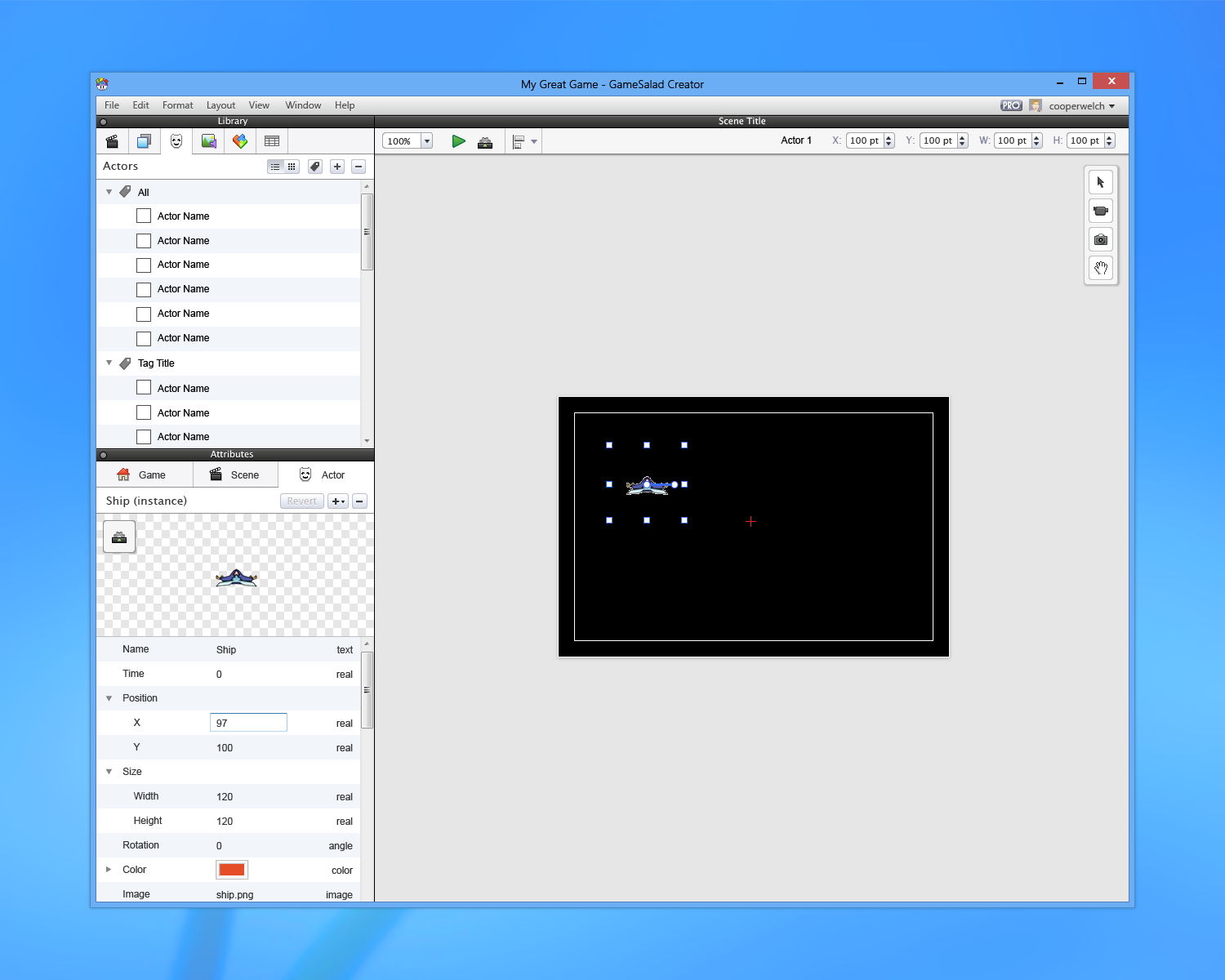
GameSalad for Windows
Scene Editor
The scene editor was the part of GameSalad’s interface that showed a preview of what a game would actually display when it's played. It contained "actors" (the moving components of a game), background images, camera tools, and tools for positioning and aligning different actors with each other.
Library
The library panel was where users managed the assets in a game project. It contained tabs for scenes, layers, actors, images and audio files, game logic blocks (also known as "behaviors" - more detail on those in a bit), and table data.
Attribute Editor
The attribute editor was where users managed the attributes of specific actors in their scenes. Attributes included things like color, size, position, and rotation.
Multi-select
In the original Mac version of GameSalad, there was no multi-select capability within the scene view - only one actor could be selected at a time. For the Windows version of GameSalad, I designed and oversaw the implementation of multi-select functionality. Surprisingly, multi-select turned out to be pretty complicated...there were several use cases to account for.
Alignment and Distribution Tools
Another missing component from the original GameSalad Creator was alignment and distribution tools. I created detailed specs for how alignment and distribution tools should work, and worked with engineers to implement this feature.
Backstage, Rules, and Behaviors
Backstage was the part of GameSalad's interface where game logic could be added, removed, and manipulated to make the game actually do things. It was the heart and soul of GameSalad, a place where static objects could have life injected into them. Templated blocks of game logic called "behaviors" could be added to specific actors in a game scene. For example, you might have a behavior called "Move" that makes an actor move in a certain direction at a certain speed. Multiple behaviors could be pieced together to create a larger and more meaningful whole. Behaviors lived inside containers called ‘Rules,’ which specified triggering conditions for activating behaviors. A rule would look like this: "When [x] happens, do [y], else do [z]," where x is a condition, and y and z are behaviors.
Here is the state of backstage for an actor that has no behaviors currently added:
And here are some specifications showing how behaviors look stacked on top of one another, as well as how behaviors can be collapsed and dragged to new locations:
An actor tab would appear in backstage when the actor was selected in the scene view - this meant that deselecting the actor would cause the tab to be removed. We decided to introduce pinnable backstage tabs, so we could keep actors open in backstage at all times, as well as have multiple actors open at the same time.
Here are some of the basic states for rule blocks, rule conditions, and behaviors inside of rules:
In addition to rules and behaviors, notes could also be added to the game logic stack. Notes were simply meant to act as comments for game developers.
Expression Editor
The expression editor was a widget that allowed users to create complex mathematical equations to perform more advanced game logic operations. It was accessible from within certain behaviors, and made use of actor attributes or preset mathematical functions. I worked with engineers to redesign the expression editor from the pre-existing Mac application, with the goal of making it faster and more intuitive for users.
Auto Complete
Auto complete was a new feature that we implemented inside the backstage panel. It allowed users to enter behaviors into their logic stack by typing the name of the behavior to be added. I designed how auto complete should behave, and worked with the engineers to ensure a smooth implementation. This feature was a huge time saver for GameSalad developers.
Dashboard
The dashboard was the first thing users would see when opening GameSalad. It provided access to pre-made game templates, recent project files, and tutorials on using GameSalad.
Conclusion
GameSalad Creator for Windows significantly improved on the existing version of GameSalad for Mac. I spent a lot of time trying to understand the needs of game developers using the platform, and rethinking the UI so that it would be as intuitive and user-friendly as possible. I was also able to work with product managers and engineers to design and develop new features that were extremely helpful for game developer workflows - features such as multi-select and actor alignment tools. It was extremely rewarding to design a product that became a tool for others to express their creativity, and to attempt to streamline the game development process for people who didn’t have any programming experience. Overall, I’m really happy with the work that I did on this project, and I still consider it one of the most fun products I’ve ever worked on.